About a year ago, I bought this little wooden trash can from Hobby Lobby. It was normally $5.99, but I snagged it for half off, in the hopes I would spray paint it and put it in my laundry room for something other than the ugly white plastic trash can I had in there.
Well, time slipped away from me and I forgot about the trash can until the other day when I was cleaning up the laundry room and I decided to get it out of the garage and finally replace my old trash can for the new one.
This is what I started with. I got out a can of Rustoleum White Primer, because I wanted to see how the wood would react with the spray paint.
It looked good white, and didn't get all weird and textured and need sanding like I was afraid it might.
So, I got out the black spray paint and went to town!

This is after one coat - it clearly needed 2 and I wanted to make sure to spray paint the inside of the trash can as well. Since it is hotter than Hades here in South Texas, it literally took 15 minutes from start to finish.

This is what it looked like once I brought it inside - all nice and pretty!
Then I sat down and FINALLY got my Silhouette machine out (D bought it for me in December). I patiently read every step and instruction and then plugged it in and did exactly how it said. I decided instead of a design on it, I would just put the word "trash" to see how the machine would cut vinyl.
I have a couple of future projects in mind, so I thought that I'd use this cheap little trash can as my test run.
I cut the vinyl out and carefully applied it to the trash can and this is what I came up with...

The font is called "Just Realize"
Not too bad for my first attempt, I don't think.
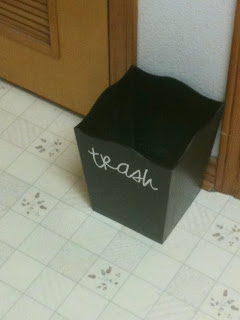
And this is it all done and in place.

And this is my laundry room. I just keep that little trash can across from my machines, to put lent in when I clean out the dryer or the occasional dryer sheet, so it doesn't have to be big and sturdy but no reason it has to be ugly either!


 This is after one coat - it clearly needed 2 and I wanted to make sure to spray paint the inside of the trash can as well. Since it is hotter than Hades here in South Texas, it literally took 15 minutes from start to finish.
 This is what it looked like once I brought it inside - all nice and pretty!
 The font is called "Just Realize"
Not too bad for my first attempt, I don't think.
 And this is it all done and in place.